
Guide for Firm Administrators
The screens shown are from an invented example firm (Example Law LLP) and invented cases. No real patient information appears.
1Your role as administrator
As your firm's administrator you control who in your firm can see the medical records MSS releases on the portal. You can:
- see every case of your firm that has something released on the portal, and open its records
- assign a case to a colleague, so they can open it too
- withdraw that access again at any time
- see who holds what, and a log of every assignment and withdrawal
Your colleagues see only the cases MSS released to them, plus the cases you assign to them. A case with nothing released yet never appears, even to you.
2Becoming an administrator
MSS names each firm's administrator(s). To be named, send MSS:
- your work e-mail address (at your firm's own domain)
- your own date of birth: you will sign in with it
A firm can have more than one administrator. Only MSS can add or remove an administrator. If an administrator leaves or changes role, tell MSS straight away.
3Signing in
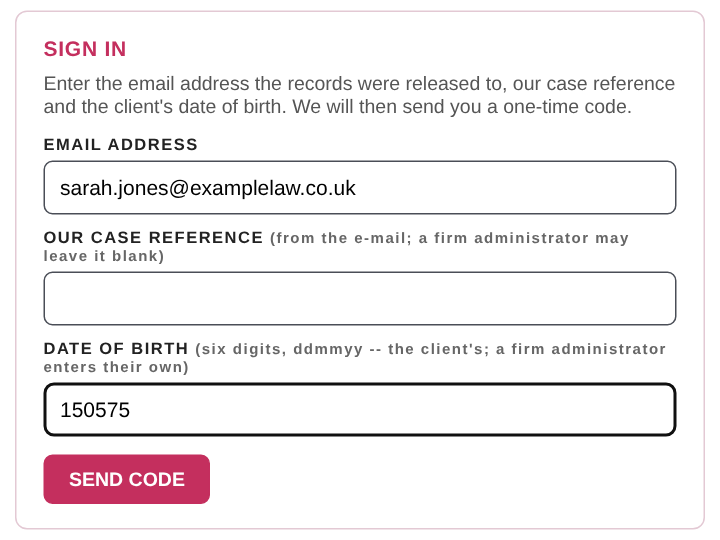
- Go to https://portal.mssrecords.co.uk.
- Enter your e-mail address.
- Leave our case reference blank.
- Enter your own date of birth as six digits, day-month-year (15 May 1975 = 150575), not a client's.
- Press SEND CODE, then type in the 6-digit code e-mailed to you. It is valid for 30 minutes.
After 5 wrong dates of birth within 30 minutes your address is locked for 30 minutes. Every sign-in by an administrator is recorded in your firm's log.
4Your firm's cases
You land on YOUR CASES: one line per case of your firm, with our reference, the client, your reference, the number of records, the date of the last release and which colleagues also hold it. Press OPEN to go into a case.
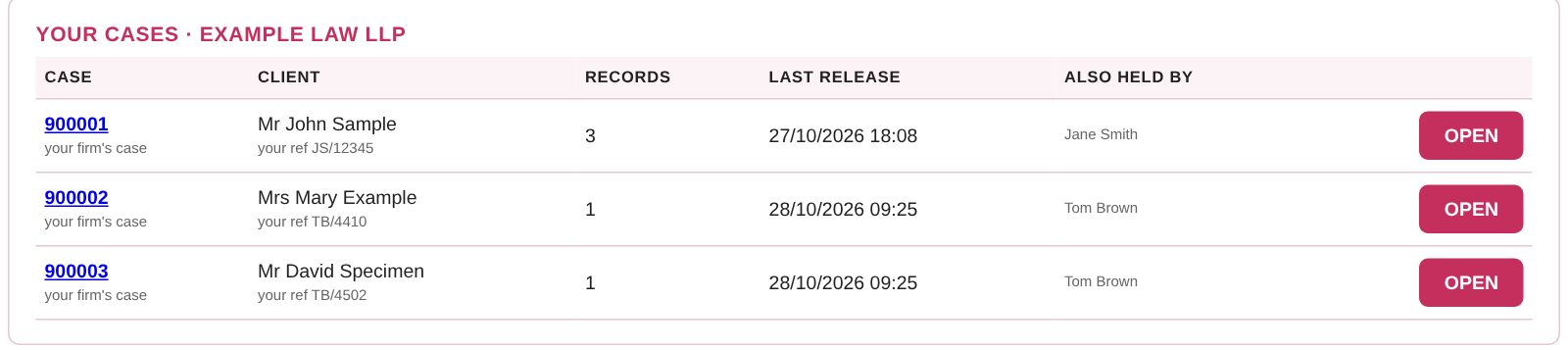
Under each case reference it says how you hold it: released to you, or your firm's case (you see it as administrator). Inside a case everything works as described in the Guide for Solicitors and Instructing Parties: opening, downloading, scans, ASK and sending files to MSS.
5Giving a colleague access
Below your cases is your firm's ADMINISTRATOR panel.

- Choose the case in CASE.
- Enter your colleague's e-mail address in EMPLOYEE'S E-MAIL.
- Press ASSIGN.

Your colleague is e-mailed straight away to say they have been given the case. They sign in with the client's date of birth and a code, like any recipient.
Which addresses can be given a case. Only an address at your firm's own e-mail domain, or one MSS has approved for your firm. Shared and public addresses (Gmail, Outlook, nhs.net and similar) are never accepted automatically. If an address is refused, ask MSS to approve it.

6Who holds what
WHO HOLDS WHAT lists each colleague who can see a case of your firm:
| Column | What it shows |
|---|---|
| Employee | The colleague's e-mail address and name |
| Released by MSS | Cases MSS released to that person directly |
| Assigned here | Cases given to them by an administrator (or by MSS on your firm's behalf), each with a WITHDRAW button |

7Withdrawing access
Press WITHDRAW beside the case in Assigned here. Access ends immediately, including for a colleague who is signed in at that moment.
You can withdraw only what was assigned. A case MSS released directly to a colleague can be withdrawn only by MSS: contact us and we will do it at once.
8The authorisation log
The AUTHORISATION LOG at the foot of the panel records, with the date and time, who did what:
- administrator named or removed (by MSS)
- administrator signed in
- case assigned and case withdrawn, and by whom
- addresses approved by MSS

Every assignment and withdrawal is also written to MSS's own audit of the case, alongside every view and download.
9Good practice
- Assign a case only to colleagues who work on that matter.
- Review WHO HOLDS WHAT regularly, and withdraw access when a colleague moves off a matter.
- When someone leaves your firm, withdraw their assignments and tell MSS, so we can end anything released to them directly.
- Never share your sign-in, and never forward a release e-mail: assign the case instead.
- If something has been released that should not have been, do not open it further and contact MSS straight away.
10Medical experts
The administrator role is for instructing parties. Releases to medical experts are personal to the expert: they are not shown to a firm administrator and cannot be assigned. If an expert's secretary or colleague needs access to a case, the expert should ask MSS, and we will release it to them directly.
11Help
| Problem | What to do |
|---|---|
| "Date of birth not recognised" | Enter your own date of birth as six digits (150575), and leave the case reference blank |
| No code arrives | Check your junk folder for an e-mail from codes@mssrecords.co.uk, then ask for a new code |
| Locked out | Wait 30 minutes, or contact MSS |
| A case is missing from YOUR CASES | Nothing has been released on it yet, or MSS released it to an expert only. Contact MSS if you expected it |
| "… is not at yourfirm.co.uk -- ask MSS to approve that address first" | Ask MSS to approve the address for your firm |
| No WITHDRAW button for a case | It was released by MSS directly: ask MSS to withdraw it |
| A new administrator is needed | Send MSS their work e-mail and their own date of birth |
Medical Services Solutions Ltd · Ground Floor, The Annexe, 3 Harman Close, London NW2 2EA
T 020 8205 0000 · E info@mssgroup.co.uk · W www.mssgroup.co.uk
Please quote our case reference when you contact us about a case.